When your domain expires: who gets the mail for your old addresses
A domain feels like something you own. In practice you rent it for a year or more at a time. If nobody pays the next renewal, the domain eventually goes back on sale, and whoever buys it decides where its mail goes from then on.
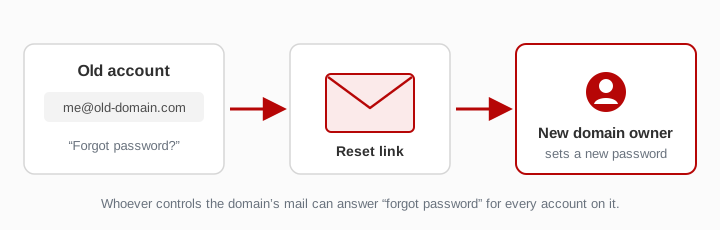
That matters more than it seems. Every address on the domain that you once gave to a website (shop@, forum@, me@) works as a key to the account behind it. Whoever receives the mail for that domain can ask those websites to send a password reset. This guide explains what happens step by step and what to do before you let a domain go.
What happens after the expiry date
For common generic domains such as .com, .net or .org, the path usually looks like this. Exact periods depend on the registrar and the top-level domain. Country domains (.uk, .de, .ua and others) have their own rules.
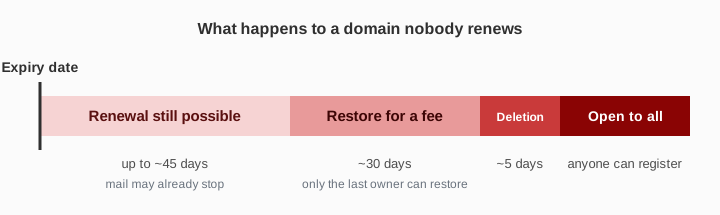
| Stage | Typical length | What it means for mail |
|---|---|---|
| Expired, still renewable | up to about 45 days, set by the registrar | you can renew at the normal price; many registrars park the domain, and mail may stop arriving already |
| Redemption | about 30 days | the domain no longer works; only you can restore it, usually for an extra fee |
| Pending deletion | about 5 days | nobody can restore it; it is about to be released |
| Released | — | anyone can register it; popular names are often taken within moments by automated services |
Some registrars also auction expired domains during the renewal period, so a domain can change hands before it is ever deleted. If your domain is in one of the first two stages, contact the registrar the same day: the price goes up at each stage, and once deletion has started nobody can stop it.
How to check the expiry date
Look your domain up in a WHOIS or RDAP lookup tool and find the expiry date of the registration. Your registrar account shows the same date, sometimes with an earlier deadline of its own for automatic renewal. Put the earlier of the two in your calendar.
Why a lost domain can open your accounts
A new owner of the domain can add an MX record of their own, just as you once did. Once it takes effect, every letter sent to any address on the domain reaches them. Many websites let you reset a password with nothing more than a link sent by email. Someone who wants your accounts does not need your password. They need your old domain and a list of sites where you might have used it.
Some buyers hunt for expired domains for exactly this reason, others for the visitors and mail that still arrive. A name that was in use for years may be worth more to them than a fresh one.
The same applies while the domain points here
If your domain receives mail on this site, its mailboxes are public. Anyone who types an address on your domain sees what arrives there. That is fine for sign-up tests and throwaway registrations. It also means an account you care about should never depend on such an address, even while the domain is still yours. The setup guide makes the same point before its first step.
Before you let a domain go
- List the accounts that use the domain. Search your password manager and your main mailbox for the domain name. Sign-up confirmations and newsletters show where an address was used.
- Move each important account to an address you will keep. Change the email in the account settings and confirm the change. Do the ones with payment details, cloud storage and your main email first.
- Turn on two-step sign-in where you can. With it, a password reset alone is not enough to get in.
- Delete the accounts you no longer need. An account that no longer exists cannot be taken over.
- Only then stop renewing. If the list is long or you are unsure, renewing for one more year is cheaper than finding out which account you forgot.
If you want to keep the domain
- Switch on automatic renewal and keep a valid payment card on the registrar account.
- Check where renewal reminders go. If the registrar writes to an address on the same domain, and that domain is the one about to expire, you will not see the reminder. If that address is a public mailbox on this site, anyone can read the reminder, not just you. Use a separate, private address for the registrar account.
- Register for several years at once if the domain carries accounts you rely on. It removes a yearly chance to forget.
- Lock the domain against transfer in the registrar settings. Most registrars offer it, and many turn it on by default. It guards against unauthorised transfers, not against expiry.
If you just want mail to stop arriving here
You do not need to give up the domain for that. Delete the MX record that points here, or put your previous one back. New letters then go wherever your records point. Letters that already arrived stay visible for a while — at least a few days, often longer. The domain itself stays yours as long as you renew it.
If you have already lost a domain
If an old domain of yours now belongs to someone else, assume that anything sent to it can be read. Go through the accounts that used it, change their email address and password, and turn on two-step sign-in. Treat any password-reset letter you did not ask for as a warning.
Short version
- An expired domain does not disappear. Sooner or later someone else can own it and read its mail.
- Every account registered with an address on that domain can then be reset by the new owner.
- Move or delete important accounts first, let the domain go second. When in doubt, renew for another year.